

WiFi radiation is RF electromagnetic energy emitted by routers in the 2.4 GHz and 5 GHz bands. Typical routers transmit at 1-2 watts, sending beacon pulses about 10 times per second.
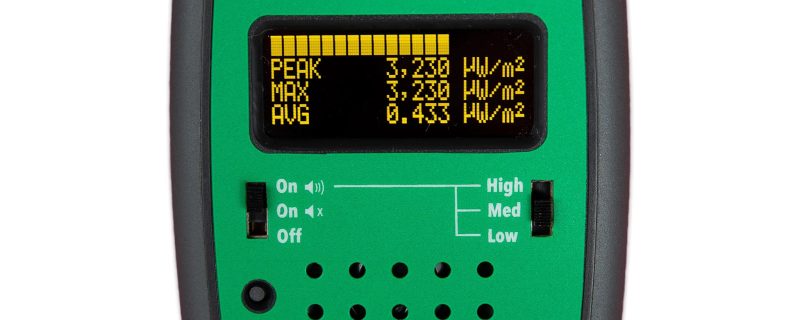
Consumer RF meters can measure WiFi levels: 10,000-100,000 µW/m² at 1 foot, dropping to 300-3,000 µW/m² at 6 feet. For health context, see my guide to WiFi and health.
Medical Disclaimer: This article is for informational purposes only. It is not, nor is it intended to be, a substitute for professional medical advice, diagnosis, or treatment and should never be relied upon for specific medical advice.
Key Takeaways
- WiFi operates at 2.4 GHz and 5 GHz frequencies, both in the microwave portion of the electromagnetic spectrumThe electromagnetic spectrum is the complete range of electromagnetic radiation, organized by wavelength and frequency. It spans from radio waves (lowest frequency) through microwaves, infrared, visible light, ultraviolet, X-rays, to...
- Standard routers transmit beacon pulses about 10 times per second, even when no devices are actively using the connection
- WiFi radiation follows the inverse square law: doubling distance reduces exposure by 75%, and at 3 feet power densityPower density measures how much electromagnetic energy passes through a given area, expressed in watts per square meter (W/m²) or milliwatts per square centimeter (mW/cm²). This unit is primarily used... ranges from 1,000-10,000 µW/m²
- Building Biology guidelines consider levels above 1,000 µW/m² in sleeping areas a concern, far below official FCC limits
- Consumer RF meters ($150-400) can accurately measure WiFi radiation in your home
Understanding WiFi Frequencies
WiFi routers communicate using radiofrequencyRadiofrequency (RF) refers to electromagnetic waves in the frequency range of approximately 3 kHz to 300 GHz. This portion of the electromagnetic spectrum is used for wireless communication. RF energy... waves in specific frequency bands allocated by the FCC. Understanding these frequencies helps you make informed decisions about your setup.
2.4 GHz Band
The original WiFi frequency, still widely used today.
| Characteristic | Detail |
|---|---|
| Frequency range | 2.400-2.4835 GHz |
| Wavelength | ~12.5 cm |
| Channels | 11 in the US |
| Wall penetration | Good (travels through walls easily) |
| Range | Longer (covers larger areas) |
The 2.4 GHz band penetrates walls better, which means WiFi signals—and radiation—reach more areas of your home.
5 GHz Band
The newer, faster frequency band.
| Characteristic | Detail |
|---|---|
| Frequency range | 5.150-5.850 GHz |
| Wavelength | ~5.5 cm |
| Channels | 24+ non-overlapping |
| Wall penetration | Poor (blocked more by walls) |
| Range | Shorter (better for same-room use) |
5 GHz signals attenuate faster, which can actually work in your favor—less whole-home penetration means potentially less exposure in distant rooms.
WiFi 6E (6 GHz)
The newest band, available on WiFi 6E routers.
| Characteristic | Detail |
|---|---|
| Frequency range | 5.925-7.125 GHz |
| Wavelength | ~4.5 cm |
| Wall penetration | Very poor |
| Range | Shortest |
Higher frequencies mean even more rapid signal attenuation. WiFi 6E is primarily useful for same-room, high-bandwidth applications.
How WiFi Routers Emit Radiation
Understanding the transmission patterns helps explain why WiFi exposure is continuous, not just when you’re actively using the internet.
Beacon Pulses
Your router constantly broadcasts “beacon frames”—short signals that announce the network’s presence. Standard routers send these approximately 10 times per second, whether or not any device is connected.
This is why your WiFi router emits radiation 24/7, not just during active use.
Data Transmission
When you’re streaming video, downloading files, or browsing the web, the router emits additional radiation to send and receive data. This is more variable and depends on your internet activity.
Router Power Levels
Most consumer routers transmit at 1-2 watts of power. This is comparable to a cell phone during an active call, but with a key difference: your router runs continuously, while phone calls are intermittent.
| Router Type | Typical Power Output |
|---|---|
| Standard home router | 100 mW – 1 W |
| High-power router | 1-2 W |
| Mesh network node | 500 mW – 1.5 W |
| WiFi extender | 500 mW – 1 W |
Measuring WiFi Radiation
You don’t have to guess about your WiFi exposure. Consumer-grade RF meters can accurately measure the radiation levels in your home.
Recommended Equipment
Budget Option: Safe and Sound Classic III (~$170)
- Range: 200 MHz to 8 GHz (covers all WiFi bands)
- Display: LED indicators showing exposure level
- Best for: Quick assessments and hotspot identification
Mid-Range Option: EMFields Acoustimeter 2 (~$350)
- Range: 200 MHz to 8 GHz
- Display: Digital readout with audio feedback
- Best for: Detailed measurements and before/after comparisons
Professional Option: Gigahertz Solutions HF35C (~$350)
- Range: 800 MHz to 2.7 GHz
- Display: Analog meter with digital readout
- Best for: Precise technical measurements

For detailed recommendations, see my guide to the best EMF meters and detectors.
How to Measure
- Locate your router and identify measurement points
- Turn off other RF sources (phones in airplane mode, etc.) for accurate router-only readings
- Measure at multiple distances: 1 foot, 3 feet, 6 feet, 10 feet
- Hold the meter steady for 30-60 seconds at each point to capture beacon pulses
- Record both peak and average readings
Typical Readings
Here’s what you can expect to measure from a standard home WiFi router:
| Distance | Typical Power Density |
|---|---|
| 1 foot (0.3 m) | 10,000-100,000 µW/m² |
| 3 feet (1 m) | 1,000-10,000 µW/m² |
| 6 feet (2 m) | 300-3,000 µW/m² |
| 10 feet (3 m) | 100-1,000 µW/m² |
| 20 feet (6 m) | 25-250 µW/m² |
Readings vary based on router model, power settings, and measurement timing relative to beacon pulses.
Interpreting Your Measurements
What do these numbers mean? Here’s context from the Building Biology evaluation guidelines for sleeping areas:
| Power Density | Building Biology Assessment |
|---|---|
| < 10 µW/m² | No concern |
| 10-100 µW/m² | Slight concern |
| 100-1,000 µW/m² | Severe concern |
| > 1,000 µW/m² | Extreme concern |
Compare these guidelines to typical router readings at 3 feet (1,000-10,000 µW/m²), and you can see why EMF-conscious homeowners take WiFi placement seriously.
Official Safety Standards
For context, here are the regulatory limits:
| Standard | Limit |
|---|---|
| FCC (USA) | 10,000,000 µW/m² at 2.4 GHz |
| ICNIRP (International) | 10,000,000 µW/m² at 2.4 GHz |
| Building Biology (sleeping areas) | < 10 µW/m² |
The official limits are designed to prevent tissue heating. They’re approximately 1,000 times higher than Building Biology precautionary guidelines.
The Inverse Square Law: Why Distance Matters
WiFi radiation intensity decreases rapidly with distance following the inverse square law. This is your most powerful tool for reducing exposure.
The math:
- Double your distance → Exposure drops to 1/4
- Triple your distance → Exposure drops to 1/9
- 10x your distance → Exposure drops to 1/100
Practical example: If your router measures 40,000 µW/m² at 1 foot:
- At 2 feet: ~10,000 µW/m²
- At 4 feet: ~2,500 µW/m²
- At 8 feet: ~625 µW/m²
- At 16 feet: ~156 µW/m²
Moving from 1 foot to 10 feet reduces exposure by approximately 99%.
WiFi vs. Other Household RF Sources
How does WiFi compare to other common RF emitters in your home?
| Source | Typical Power | Exposure Pattern | User Control |
|---|---|---|---|
| WiFi Router | 1-2 W | Continuous (24/7) | Can turn off/reduce |
| Cell Phone (call) | 0.5-2 W | During calls only | Full control |
| Cell Phone (idle) | 0.001 W | Intermittent pings | Can use airplane mode |
| Bluetooth Headphones | 0.001-0.01 W | When connected | Can disable |
| Smart TV (WiFi) | 0.1-0.5 W | When on | Use Ethernet instead |
| Baby Monitor | 0.01-0.1 W | Continuous when on | Limited |
| Smart Meter | 1-2 W | Brief pulses or continuous | None |
WiFi is notable for its combination of moderate power and continuous operation.
Factors That Affect Your WiFi Exposure
Several variables influence how much WiFi radiation you’re actually exposed to.
Router Settings
Most routers allow you to adjust transmission power. Reducing from 100% to 50% can significantly cut emissions while maintaining adequate coverage for smaller homes.
Number of Devices
More connected devices mean more data transmission. A home with 30 WiFi devices generates more RF traffic than one with 5.
Router Placement
A router in the center of your home maximizes coverage but also maximizes whole-home exposure. A router in a corner or utility room reduces exposure in living spaces.
Building Materials
Walls, floors, and ceilings attenuate WiFi signals. Metal and concrete block more than drywall and wood. This affects both coverage and exposure.
Mesh Networks
Mesh systems use multiple access points throughout your home. While each node may emit less than a single powerful router, you’re surrounded by more emitters.
Common Misconceptions
Misconception: WiFi radiation is the same as the radiation from nuclear materials. Reality: WiFi uses non-ionizing radiofrequency radiationRadiofrequency radiation (RFR) is electromagnetic energy in the frequency range of 3 kHz to 300 GHz. This type of non-ionizing radiation is emitted by wireless devices and communication infrastructure. Cell..., completely different from ionizing radiationIonizing radiation is electromagnetic energy with enough power to remove electrons from atoms, creating charged particles called ions. This includes X-rays, gamma rays, and ultraviolet radiation. Unlike the non-ionizing radiation... like X-rays or gamma rays. They’re both called “radiation” but have fundamentally different properties.
Misconception: 5 GHz WiFi is more dangerous because it’s a higher frequency. Reality: 5 GHz signals actually penetrate walls less effectively, which can mean reduced whole-home exposure. Neither frequency has been proven safe or dangerous for long-term exposure.
Misconception: You can’t measure WiFi radiation without expensive equipment. Reality: Consumer RF meters in the $150-350 range accurately measure WiFi frequencies and are sufficient for home assessment.
Misconception: WiFi only emits radiation when you’re using the internet. Reality: Routers continuously emit beacon pulses (~10 per second) to maintain network presence, regardless of whether any device is actively transferring data.
What Your Measurements Mean for Action
Based on your measurement results, here are recommended next steps:
| Sleeping Area Reading | Recommended Action |
|---|---|
| < 10 µW/m² | No action needed |
| 10-100 µW/m² | Consider relocating router or turning off at night |
| 100-1,000 µW/m² | Relocate router and/or implement nighttime shutdown |
| > 1,000 µW/m² | Relocate router, reduce power settings, consider shielding |
For specific protection strategies and product recommendations, see my WiFi protection guide. For help choosing a product, check out our WiFi EMF blocker comparison.
Related Reading:
- WiFi and Health: Is WiFi Radiation Harmful?
- WiFi Protection: Routers, Covers & EMF Solutions
- Best EMF Meters and Detectors
Frequently Asked Questions
A typical home router transmits at 1-2 watts, sending beacon pulses about 10 times per second. At 3 feet, this produces power density readings of approximately 1,000-10,000 µW/m².
5 GHz can deliver faster data speeds but has shorter range and poorer wall penetration. In terms of radiation, the two bands have similar power levels, but 5 GHz coverage is more localized.
No. Smartphone EMFEMF stands for electromagnetic field (also called electromagnetic frequency or electromagnetic force). EMFs are invisible fields of energy produced by electrically charged objects. They exist on a spectrum ranging from... apps are not accurate for RF measurement. You need a dedicated RF meter with proper antenna and calibration to measure WiFi radiation.
Yes, especially at 2.4 GHz. This is why you can get WiFi signal in different rooms. 5 GHz signals are blocked more by walls and floors.
WiFi signals can travel 150+ feet outdoors but are reduced by walls and obstacles indoors. The radiation doesn't stop at a certain distance—it continuously decreases following the inverse square law.
Completely. When powered off, the router emits no RF radiation. Using a timer switch to turn off WiFi at night eliminates approximately 8 hours of daily exposure.